Duplicate Detection
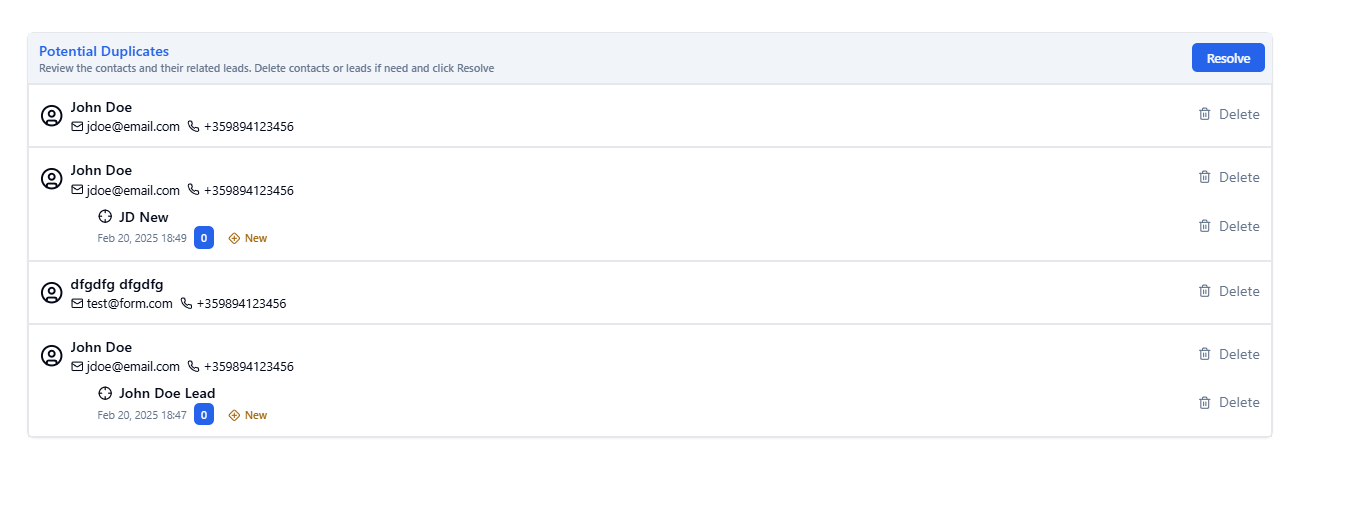
A duplicate detection system is monitoring for duplicate contacts. When a new contact is created, the system automatically checks if a contact with either the same phone number or email already exists. If yes, a Duplicate Case is created with all matches. The user will then be warned:
-
within the Contact View of a contact that is part of a Duplicate Case

-
within the Lead View of a lead connected to that is part of a Duplicate Case

Upon clicking on the warning the user will be redirected to a duplicate managment view. The user can review all potential duplicate contacts and their related leads, and delete them directly from this view, if they are indeed duplicates. After the review is completed, the user can click Resolve and the warning message won`t displayed anymore in the corresponding Lead and Contact Views.
Additional duplicate detection rules
Duplicate detection rules can be customized on per school basis. Please contact support for more information.